

Introduction
I’ve been planning to implement math notation to transcribe my lecture notes into my blog. After spending a few hours experimenting with libraries like rehype-katex-svelte, markdown-it, and MathJax, I kept running into rendering issues with Markdown content. I finally found a component based solution that works with my existing static Markdown setup — probably not the most optimal, but functional for now. In this post, I’ll describe the approach, which might be useful for you as well. If you’d like to explore the code, you can check out the basic template on this repository.
1. Creating the svelte project
In order to follow this post, you need to install node first. You can use this link.
First we open our terminal and create a svelte project:
open your terminal and enter the following to activate svelte creation process on your command line interface.
npx sv create math_in_markdownThen in the console I follow this steps provided by svelte cli prompts to create minimal svelte project.
    1. which templte would you like?
        - SvelteKit minimal (barebones scaffolding for your new app)
    2. Add type checking with TypeScript?
        - Yes, using TypeScript syntax
    3. What would you like to add to your project. (use arrow keys / space bar)
        - prettier
        - eslint
        - sveltekit-adapter
        - devtools-json
        - mdsvex

        3.1. sveltekit adapter: Which sveltekit adapter would you like to use?
            - auto
    4. Which package manager do you want to install dependencies with?
        - pnpm
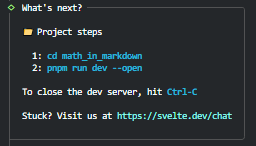
Figure 1: Svelte base setup
After this our base svelte project is ready. Now lets go and run the project
    cd math_in_markdown
    pnpm run dev --open-
Our project is running.
2. Rendering markdown
Now lets render markdown. In order to to this, we need a markodwn file to test with.
- We create content directory first. You can do it through ui, or cli
mkdir src/content- Lets create some markdown files to render in our app. For this purpose I did little bit internet search to find a markdown test document: one of the one I believe good is this. But Nevertheless we will create very simple one:
create src/content/test.md file as:
content/test.md
## Hello from markdown

>
> Expect this text to be in block!
> - Now we have our content to render. and we need to write logic to render this content. To keep things simple. We will render this single element hard coded. Lets create the page.
Now in test folder we create a base +page.svelte file which holds our render logic.
src/routes/+page.svelte
<script lang="ts">
</script>

hello world.
If we go to localhost:<port> we should be able to see our hello world text. But before rendering markdown on the page we need to set two more things.
- First we will give alias to our content folder to be able to reference in our page.
We will open our vite.config.ts and insert alias tag for our content directory. To reference our markdown files in svelte page.
vite.config.js
import devtoolsJson from 'vite-plugin-devtools-json';
import { sveltekit } from '@sveltejs/kit/vite';
import { defineConfig } from 'vite';
//  v v v v v                              ADD: import built-in path package
import path from 'path';
//  ʌ ʌ ʌ ʌ ʌ

export default defineConfig({
	plugins: [sveltekit(), devtoolsJson()],

//  v v v v v                              ADD: Add this group to resolve alias paths
	resolve: {
		alias: {
			// This maps $content to the actual src/content directory
			$content: path.resolve('./src/content')
		}
	}
//  ʌ ʌ ʌ ʌ ʌ
});- Next we will introduce our app to recognize .md extensions to be handled by
mdsvex
svelte.config.js
import { mdsvex } from 'mdsvex';
import adapter from '@sveltejs/adapter-auto';
import { vitePreprocess } from '@sveltejs/vite-plugin-svelte';

//  v v v v v                                               ADD: create mdsvexObtions object to recognize md extensions
const mdsvexOptions = {
	extensions: ['.md'],
}
//  ʌ ʌ ʌ ʌ ʌ

/** @type {import('@sveltejs/kit').Config} */
const config = {
	// Consult https://svelte.dev/docs/kit/integrations
	// for more information about preprocessors
    //                                      v v v v v       ADD: Insert options as parameter to mdsvex as preprocessor def.
	preprocess: [vitePreprocess(), mdsvex(mdsvexOptions)],
    //                                      ʌ ʌ ʌ ʌ ʌ
	kit: {
		// adapter-auto only supports some environments, see https://svelte.dev/docs/kit/adapter-auto for a list.
		// If your environment is not supported, or you settled on a specific environment, switch out the adapter.
		// See https://svelte.dev/docs/kit/adapters for more information about adapters.
		adapter: adapter()
	},
    //                               v v                    ADD: add md extension also to main config
	extensions: ['.svelte', '.svx', '.md']
    //                               ʌ ʌ

};

export default config;- Now if we import our markdown with content alias in page we can use it. lets revise our page.
src/routes/+page.svelte
<script lang="ts">
    import PostContent from '$content/post.md';
</script>

<svelte:component this={PostContent} />
At this point you should be able to see rendered markdown on your page.
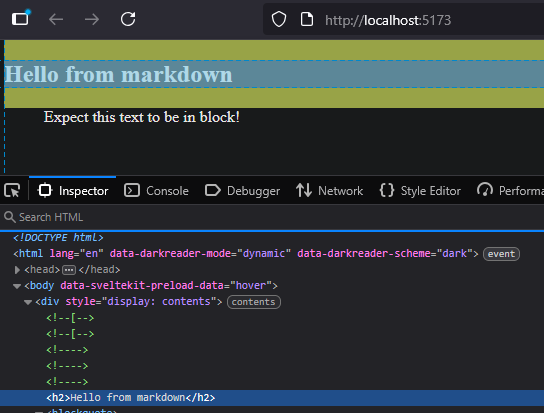
Figure 2: Markdown rendering
- (optional) At this point you might see a red underline on
$content/post.mddepending on your browser. If you want to avoid this you need to add type definitions to please typescript. You can simply define data structure for file types that we defined. Lets create:
src/types/types.d.ts
declare module '*.md' {
  import type { ComponentType } from 'svelte';
  const component: ComponentType;
  export default component;
}

Figure 3: Setting up types
Now our mdsvex module is rendering our markdown content and rendering as html elements.
3. Katex Module
Katex is module based on latex that renders plain text as math notations based on some syntax and rules.
Normally its written inside with $ like this:
#           Inline

    $a^2 + b^2 = c^2$

#           Multiline

    $$
    a^2 + b^2 = c^2
    $$
We will create our own module for katex rendering and use it inside markdown as svelte component through mdsvex. Since katex is not coming with svelte installation.
- Install katex module first.
installing katex
pnpm add katex- Then we create our katex component we will place our component
src/lib/components/Katex.svelte
<script lang="ts">
  import { onMount } from 'svelte';
  import katex from 'katex';
  import 'katex/dist/katex.min.css';

  export let expression: string = '';
  export let displayMode: boolean = true;

  let container: HTMLDivElement;

  // Function to render the expression
  function renderMath() {
    if (!container) return;
    try {
      katex.render(expression, container, {
        throwOnError: false,
        displayMode
      });
    } catch (err) {
      container.innerText = 'Invalid math expression';
      console.error(err);
    }
  }

  onMount(renderMath);

  // Re-render if expression changes
  $: expression, renderMath();
</script>

<div bind:this={container}></div>
So in this component, we provide expression to be rendered by katex to math notation. We expose two data fields to be controlled on instances. Those are expression which we will write mathematical expression, and displayMode a boolean value that controls inline/multiline display. Notice that we also import katex.css to style katex element on their own rules.
- Testing our expression by hard-coded value.
So we will update our main page.
src/routes/+page.svelte
<script lang="ts">
    import PostContent from '$content/post.md';
    //              v v v v v                           ADD: we add our component to be able to call.
    import Katex from '$lib/components/Katex.svelte';
    //              ʌ ʌ ʌ ʌ ʌ
</script>

//              v v v v v                               ADD: we add container division for some basic styling.
<div class="center">
    <svelte:component this={PostContent} />

    //              v v v v v                           ADD: provide basic expression as parameter and display mode.
    <Katex expression="a^2 + b^2 = c^2" displayMode=false />
</div>
//              ʌ ʌ ʌ ʌ ʌ

//                  v v v v v                           ADD: add simple styling for alignment.
<style>
    .center {
        width: 50%;
        max-width: 1920px;
        margin: auto;
        text-align: center;
    }
</style>
//                  ʌ ʌ ʌ ʌ ʌ
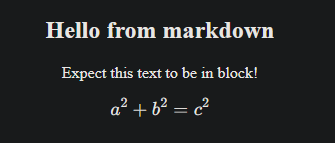
Figure 4: Rendered mathematical expression
- Testing hard coded value with more complex mathematical expressions.
Now while this is working. If we put some complex statement inside quotation marks as string. mdsvex will mismatch {} / characters with identifiers. Lets try that.
if we change expression from a^2 + b^2 = c^2 to x = \frac{-b \pm \sqrt{b^2 - 4ac}}{2a}. We will receive an error. To overcome this problem. We will wrap the expression with String.raw literal tag and since String.raw is an object, we need to wrap it with {}. So lets render new complex expression.
src/routes/+page.svelte
<script lang="ts">
    import PostContent from '$content/post.md';
    import Katex from '$lib/components/Katex.svelte';
</script>

<div class="center">
    <svelte:component this={PostContent} />

    //                 v v v v v                        CHANGE: String.raw literal with more complex math expression.
    <Katex expression={String.raw`x = \frac{-b \pm \sqrt{b^2 - 4ac}}{2a}`} displayMode=false />
</div>

<style>
    .center {
        width: 50%;
        max-width: 1920px;
        margin: auto;
        text-align: center;
    }
</style>
At this point we should be able to a proper katex rendering. On svelte page. Lets clear our page from values and embed it into markdown.
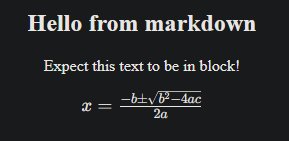
Figure 5: Relatively more complex mathematical expression
src/routes/+page.svelte
<script lang="ts">
    import PostContent from '$content/post.md';
</script>

<div class="center">
    <svelte:component this={PostContent} />
</div>

<style>
    .center {
        width: 50%;
        max-width: 1920px;
        margin: auto;
        text-align: center;
    }
</style>
4. Embedding katex component to markdown and testing
Now we can test our katex component inside markdown. We simply change $$ identifiers with more complex ones.
src/content/post.md
<!--     v v v v v                        ADDED -->
<script>
    import Katex from '$lib/components/Katex.svelte'
</script>
<!--     ʌ ʌ ʌ ʌ ʌ                              -->

## Hello from markdown

Here a mathematical expresion.

<!--     v v v v v                        ADDED -->
<Katex expression={String.raw`     <!-- $$ -->
x = \frac{-b \pm \sqrt{b^2 - 4ac}}{2a}
`} displayMode=false />            <!-- $$ -->
<!--     ʌ ʌ ʌ ʌ ʌ                              -->
To have a final test. You can use this relatively complex markdown.
src/content/post.md
---
template: 1.6
revision: 1.3
title: Test complex math notations
description: katex complex math statements tests
category:
    - sveltekit
    - svelte
tags:
    - game-design
    - draft
created: 2023-03-01
updated: 2023-03-01
author: lichzelg
language: en
visibility: true
sort_order: 1
---

<script>
  import Katex from '$lib/components/Katex.svelte'
</script>

# Testing KaTeX with Complex Expressions

### 1. Quadratic Formula (Display Mode)

This shows complex fractions and roots.

<Katex expression={String.raw`
x = \frac{-b \pm \sqrt{b^2 - 4ac}}{2a}
`} displayMode={true} />


### 2. Logical Statements (Inline Mode)

An example of a conditional logical statement:

<Katex expression={String.raw`
P \implies (Q \lor \neg R)
`} displayMode={true} /> is a common way to express a logical implication.


### 3. Matrix and Systems of Equations (Display Mode)

An example of a 4x4 matrix.

<Katex expression={String.raw`
\det(A) = \begin{vmatrix}
a & b & c & d \\
e & f & g & h \\
i & j & k & l \\
m & n & o & p
\end{vmatrix}
`} displayMode={true} />


### 4. Complex Integral with Limits (Display Mode)

A definite integral example using a complex exponential function.

<Katex expression={String.raw`
\int_{-\infty}^{\infty} e^{-x^2/2} dx = \sqrt{2\pi}
`} displayMode={true} />


### 5. Piecewise Function (Display Mode)

Showing how to define a function with multiple cases.

<Katex expression={String.raw`
f(x) =
\begin{cases}
-x & \text{if } x < 0 \\
x^2 & \text{if } 0 \le x < 2 \\
4 & \text{if } x \ge 2
\end{cases}
`} displayMode={true} />


### 6. Original Integral Example (Display Mode)

<Katex expression={String.raw`
\int_0^\infty e^{-x^2} dx = \frac{\sqrt{\pi}}{2}
`} displayMode={true} />
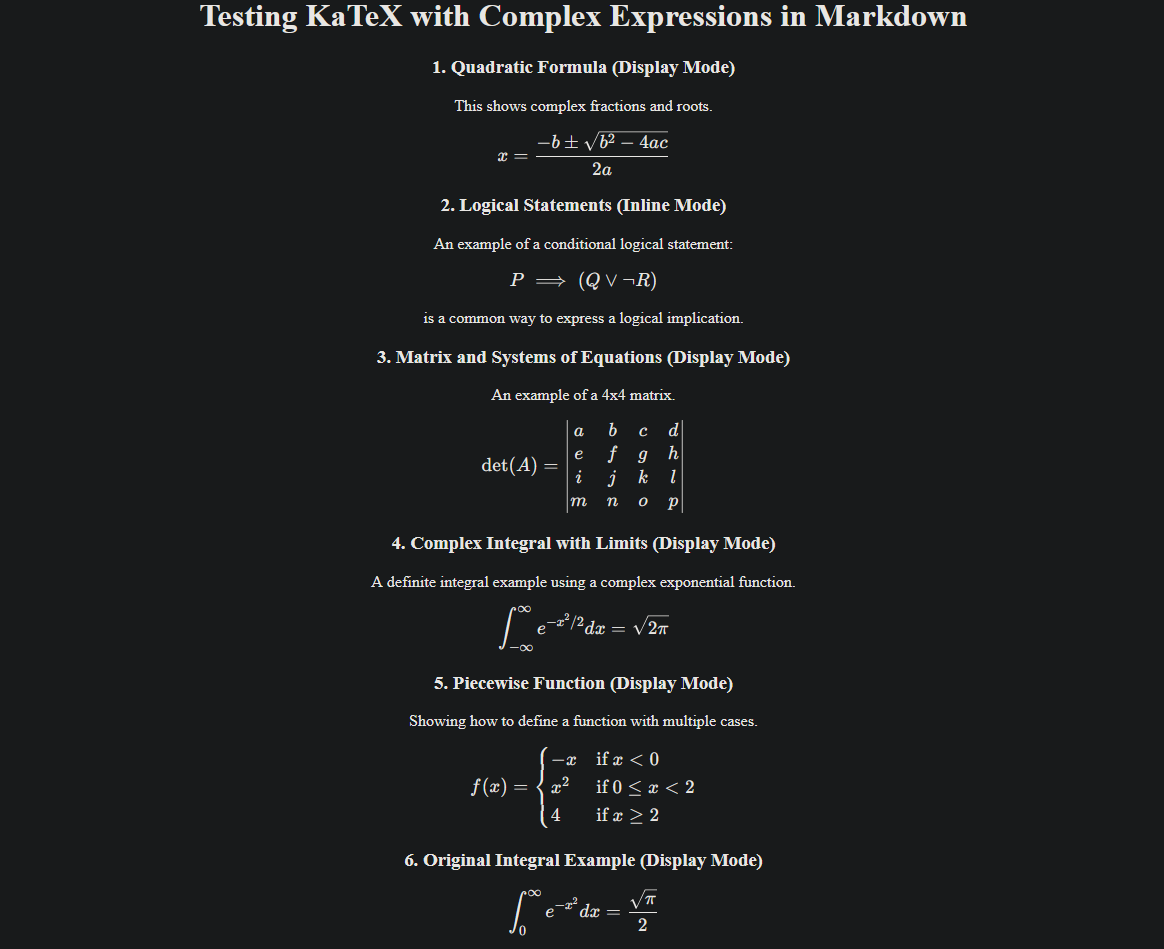
Figure 6: Final markdown / karex rendering with sveltekit
This marks the end of my first process documentation and tutorial-style blog post. I apologize for any typos or language issues, and I’d love to hear your feedback. If you’re interested, I can share more in the future—such as automated post rendering in HTML, building a content hub project, or similar topics.